Affpilot

Reduce time spent on content creation by automating blog posts, product reviews, and more.

Content Creation Tools

Ai Bulk Article Generation Short Info Article Generator Human-Like Mode Blog Article Outline Generator Biography Article Editor Amazon Review Article

Content Optimization Tools

Rewrite Paragraph Sentence Correction Generate FAQs Generate Introduction Generate Conclusion AI to Human Text Converter

SEO & Keyword Tools

Keyword Grouping Tool Scrap Competitor’s Keywords Keywords Explorer

Specialized Generators

Domain Name Generator Affiliate Application Writer Client Generator Website About Us Generator

Integrations & APIs

Add WordPress Site Add Blogger Site Add Amazon API
Blog Success Story
Videos eBook
Affiliate Career Pricing Free Writing Tools Login Free Trial
Skip to content

AI info manual subheading

AI info manual subheading

The most popular tool for writing a thousand articles with just one click is Affpilot, allowing for the creation of informative and review articles. Today, let’s look at the Affpilot feature of Info articles at a glance.
Try For Free

AI info manual subheading in just 4 easy steps

This feature allows you to write a thousand articles with just a single click effortlessly. Essentially, you provide input for 1000 keywords, and it generates and automatically publishes 1000 articles on your website simultaneously.

Step 1 — Afpilot Dashboard

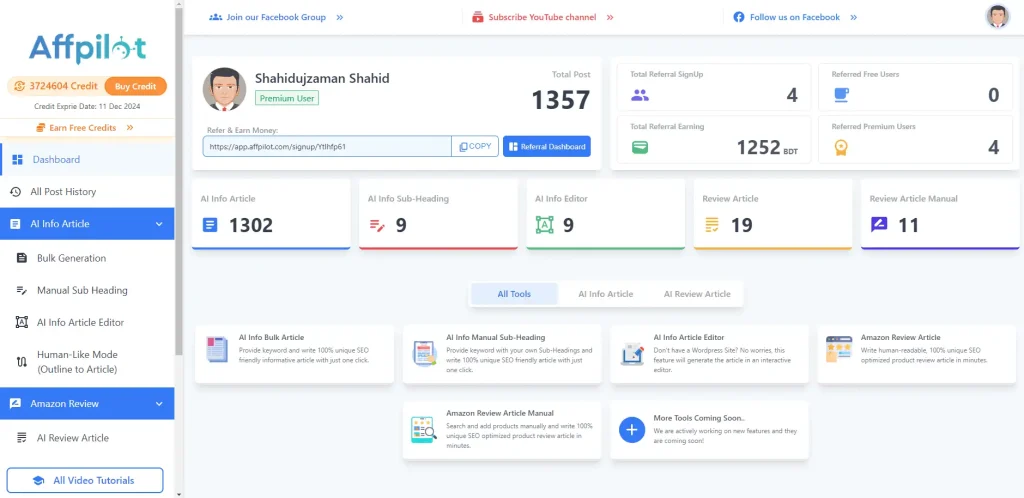
To get this feature first log in to Affpilot.com. Then you get below Dashboard

Affpilot Info Article Features and Dashboard

Step 2 — Select Input Sub Heading

Now click on the “Input Sub Heading (H2)” option.

Step 3 — Input Sub Heading (H2)

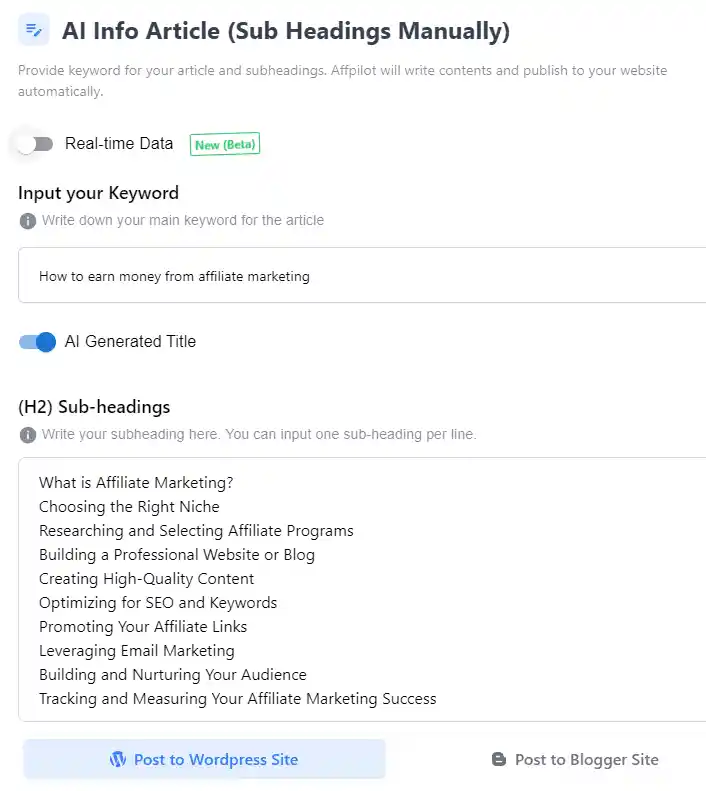
Then you get the “Input Sub Heading (H2)” option. Click on it and see the Right side.
Try For Free

Step 4 — Step By Step Guids

  1. You can write by GPT-3.5 or GPT- 4, Select anyone to start 
  2. If you click the “Real-time data” option all updated data can be added to your Article.
  3. Now write your Keywords here from 1 to 1000 as you wish.
  4. By on “AI-Generated Title” it modifies your keyword as eye-catchy.
  5. If don’t use the “AI-Generated Title” option you need to put your title here. 
  6. “(H2) Sub-Headings” Write your subheading here. You can input one sub-heading per line.   
  7. You can add your WordPress site or Blogger site here. It can help you to auto-post articles on your site.
  8. You can use the “Write & view in Editor” option if you did not add any site. 
  9. “Choose Type of Info Article” Long Post Form or Short Post Form.
  10. “Number of FAQ’s” You can fix the FAQ quantity from here. If not fixed AI will be fixed it automatically.
  11. “Include FAQ Schema” by ON this option it can add Schema automatically.
  12. “Select Image Source” You can select an Image source Pixabay or Google. By selecting Don’t use image option AI can not add any image in your Article.
  13. “Include Youtube Video” If you want to embed any YouTube  video in your article, just ON it.
  14. “Write Short info Article” Now click on it. It starts to generate your Article.

Signup Newsletter

Subscribe To Our Newsletter And Get Amazon Affiliate & Blogging Update and Exclusive Offer.

Affpilot

AI content automation to write, schedule and publish SEO-friendly articles at scale.

AFFPILOT LIMITED Incorporated at UK (Company House)
23 Albert Rd, Harrow, HA2 6PS, United Kingdom.
+8809699800987 · +44 7456 229054

About Affpilot

About Us Contact Us Join our team Affpilot Road Map

Important Link

Privacy Policy Refund Policy Delivery Policy Terms of Service Our Partners

Quick Link

Our Blog Sample 100+ Niches Pricing

Join Our Community

Facebook Linkedin Envelope
Copyright © 2026 Affpilot All Rights Reserved.
Pricing Blog Terms Privacy Refunds