Are Amazon Affiliate Links Allowed on YouTube?
Discover Are Amazon affiliate links allowed on YouTube. Learn the guidelines and tips for successful affiliate marketing on the platform.
YouTube has become a powerhouse for creators.
Video content engages millions every day.
Many creators want to earn extra income through affiliate marketing. YouTube and Amazon Associates fit together perfectly.
You might wonder: are Amazon affiliate links allowed on YouTube?
The short answer is yes.
You can place Amazon affiliate links in your video descriptions, pinned comments, and even on your channel’s About page.
You just need to follow YouTube’s and Amazon’s policies.
This guide will walk you through everything you need to know—step by step, even if you’re a beginner.
Understanding Affiliate Links and YouTube
Affiliate links are unique URLs given to you by affiliate programs.
When someone clicks your link and makes a purchase, you earn a commission.
Amazon Associates is one of the oldest and most popular affiliate programs. It lets you link to any product on Amazon, from cameras to coffee makers.
YouTube, on the other hand, offers a massive stage for your content. Combining the two lets you monetize your videos directly.
- What is an affiliate link?
A special URL containing your tracking ID. It tracks clicks and purchases you referred. - Why Amazon Associates?
Wide product range. Trusted brand. Reliable payout structure. - Why YouTube?
Over 2 billion logged-in monthly users. Highly engaged audience. Multiple monetization options beyond ads.
Many creators use YouTube as their primary channel.
They talk about tech, beauty, fitness, and more. Suggesting products in your videos can boost your revenue. The key is to integrate links naturally and comply with all rules.
Confirming: Yes, Amazon Affiliate Links Are Allowed
YouTube’s policies do not ban affiliate links. In fact, they explicitly allow “external links” in video descriptions. Amazon also permits you to share affiliate links on social platforms. As long as you follow each platform’s rules, you’re free to use those links.
- YouTube Policy on External Links
YouTube’s Community Guidelines allow creators to add links in video descriptions. There’s no restriction on affiliate URLs. YouTube only cares about spam and misleading content. - Amazon Associates Policy
Amazon’s Operating Agreement lets you share affiliate links on websites, social media, and video platforms. Just avoid link cloaking and guarantee proper disclosure.
The only caveats are to avoid spammy practices and disclose your affiliate relationship. Always place your links where viewers can see them easily and understand they’re affiliate links.
Best Places to Add Your Amazon Affiliate Links
Placing your links correctly boosts click-through rates. You want maximum visibility without cluttering your description. Here are the top spots:
- Video Description (Top 2–3 Lines)
Viewers often click “Show More.” But many don’t. Keeping affiliate links near the top ensures they get seen. - Pinned Comment
Pin a comment with your affiliate link and a brief call to action. This is visible right under the video. - Channel About Page
You can share a short bio and place evergreen affiliate links there—for example, your favorite camera or mic. - End Screens and Cards
While cards cannot link directly to Amazon, you can link to a landing page on your own site where your Amazon links live.
Tip: Use a concise call to action like “Grab this mic on Amazon!” and then your link. Keep it natural.
How to Place Affiliate Links Effectively
Simply pasting URLs isn’t enough. You need to guide your viewers. Here’s how to make your links work harder:
- Write a Short Hook
“Want this exact camera? Check it out below ⬇️” - Use Timestamps
If you discuss the product at a certain time, add a timestamp. Then link:
00:45 – Why I love this camera [Affiliate Link] - Group Links by Category
If you link multiple products, use bullets:- Best tripod: [Affiliate link]
- Top lighting kit: [Affiliate link]
- Best tripod: [Affiliate link]
- Use Plain URLs
Avoid cloaking. Amazon may ban your account if you mask URLs via redirects. - Shorten Wisely
If your link is long and ugly, Amazon lets you customize it. Use their site stripe to generate clean URLs.
Every bit of friction you remove can boost clicks. Make it seamless for viewers to find and click your links.
Disclose Your Affiliate Relationship
Honesty matters. Both YouTube and FTC (in the U.S.) require disclosure.
- FTC Guidelines
If you receive anything of value from a link, you must clearly disclose it. - How to Disclose
- In descriptions: “This post contains affiliate links. I earn a small commission at no extra cost to you.”
- Verbally: “I’ve linked this in the description—affiliate link.”
- In descriptions: “This post contains affiliate links. I earn a small commission at no extra cost to you.”
- YouTube Policy
YouTube asks creators to use their built-in “Paid promotion” toggle when including affiliate links. This shows an “Includes paid promotion” notice on your video.
A clear disclosure builds trust. Your audience will appreciate your honesty and feel comfortable clicking your links.
Avoiding Common Mistakes

Even experienced creators slip up. Here’s what to watch:
- Too Many Links
Overloading your description looks spammy. Limit to 3–5 key products per video. - Irrelevant Products
Linking a blender in a tech review confuses viewers. Stick to products you discuss or use in your video. - Broken Links
Check URLs regularly. A broken link not only loses you commissions but also harms credibility. - Cloaking or Masking
Amazon strictly forbids URL cloaking. Use clean links from their site stripe. - Ignoring Analytics
If a link underperforms, experiment with placement, wording, or even a different call to action.
Small tweaks can yield big results. Monitor link performance and refine your approach.
Measuring Your Affiliate Success
Tracking results helps you optimize. You have two main tools:
- Amazon Associates Dashboard
- Clicks: Number of clicks per link.
- Orders: Purchases made through your links.
- Conversion Rate: Orders divided by clicks.
- Clicks: Number of clicks per link.
- YouTube Analytics
- Traffic Source: How viewers find your video.
- Engagement: Watch time on videos with affiliate mentions.
- Card Clicks & End Screen Clicks: If you direct viewers to a landing page.
- Traffic Source: How viewers find your video.
Combine data from both. If a product link shows clicks but no orders, rethink your pitching style or video content.
Creative Ways to Promote Links
Beyond simple reviews, you can get creative:
- Unboxing Videos
Show new gear on camera, then link to buy it. - How-To Tutorials
Teach a skill—like “How to edit YouTube videos”—and link to your editing software on Amazon. - Comparison Reviews
Compare two products side by side. Link to both. - Top 5 Lists
“Top 5 Budget Microphones for YouTube” makes it easy to share multiple links. - Behind-The-Scenes
Show your setup and link to every piece of gear you use.
Every format offers a natural way to introduce affiliate links. Ask yourself: Which format fits your channel style?
My Personal Experience
I started monetizing my own channel five years ago. I made tech review videos. I placed affiliate links in the description. At first, I buried them at the bottom. Clicks were low.
Then I moved them to the top. My click-through rate jumped by 40%. I added clear disclosure and timestamps. Engagement rose again. Today, affiliate revenue makes up 30% of my monthly income. It freed me to invest in better gear. It gave me confidence to grow my channel faster.
Your path might differ. But you can learn from my mistakes. Place links strategically. Disclose honestly. Experiment with formats. Track results. Your channel will thank you.
Scaling Your Affiliate Content with Affpilot AI
By now, you know how to use Amazon affiliate links on YouTube. You know where to place them. You know how to optimize. Now imagine creating hundreds or thousands of written articles to complement your videos—without writing each one by hand.
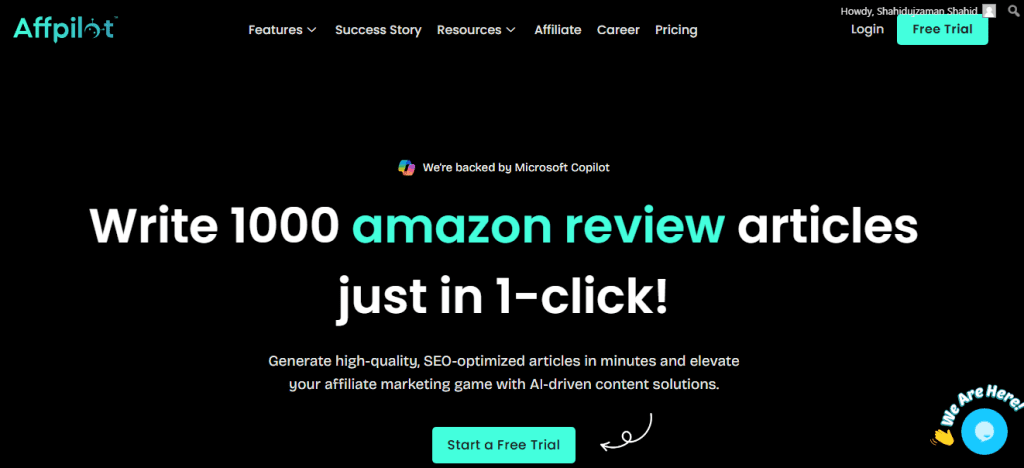
Enter Affpilot AI. It’s an auto-blogging tool that tackles content at scale.
One standout feature: you can write and publish up to 1,000 Amazon affiliate articles with your links embedded automatically.
You feed it your affiliate store ID and keywords. It fetches real-time product data and crafts SEO-friendly articles—complete with your Amazon affiliate links ready to go live on your blog or website .
Key benefits of Affpilot AI
- Bulk Article Generation: Create hundreds of reviews or listicles in minutes.
- Link Embedding: Each article includes your Amazon affiliate link exactly where it drives clicks.
- SEO Optimization: Titles, meta descriptions, and headings crafted to rank.
- Direct Publishing: Push content directly to WordPress or Blogger with one click.
By pairing your YouTube videos with a flood of related blog posts, you create a powerful content ecosystem. Videos drive immediate engagement and clicks. Articles rank in search engines and pull in passive traffic—and affiliate commissions—around the clock.
How to Get Started with Affpilot AI
- Sign Up
Visit Affpilot.com and start a free trial. - Link Your Amazon Store
Add your Amazon API credentials or store ID. - Enter Keywords
List the products or niches you want to target, one per line. - Customize Settings
Choose AI model (GPT-4 or GPT-4o Mini). Set article length and tone. - Generate & Review
Click “Write Affiliate Article.” Preview and tweak if needed. - Publish Instantly
Send articles directly to your blog or download them for manual upload.
Within minutes, you’ll have dozens or hundreds of ready-to-publish affiliate articles.
Frequently Asked Questions
Do I need coding skills to use Affpilot AI?
No. The interface is user-friendly. You don’t need to touch code.
Can I update or edit articles later?
Yes. All generated content is saved in your dashboard for easy editing.
Will Amazon ban me for bulk content?
Affpilot writes unique, SEO-friendly copy. It mimics human style to avoid duplicate-content issues.
How does pricing work?
Plans start affordably. Trial users get generous article quotas to test features.
Can I integrate with other affiliate platforms?
Affpilot focuses on Amazon, but you can manually add other links.
Next Steps to Supercharge Your Affiliate Income
You’ve learned to place affiliate links on YouTube. You’ve seen how to optimize placement, craft disclosures, and measure performance. You’ve discovered Affpilot AI can turbocharge your written affiliate content. Now ask yourself:
- Which video formats on your channel could use affiliate links?
- How many blog posts can you publish each week if you automate with Affpilot AI?
- Are you ready to build a multi-channel affiliate strategy that covers video, search, and social?
Take action today. Implement these strategies. Pair your YouTube content with an auto-blogging engine. Watch your affiliate revenue scale beyond what you thought possible.
Your affiliate journey starts now. Are you in?
Our Sample Article

Benefits of Meditation: Unlocking Peace and Productivity
Shahidujzaman Shahid · May 29, 2024
How to Choose a Probiotic: Your Essential Guide
Shahidujzaman Shahid · May 29, 2024
Why Does My Cat Keep Throwing Up? Uncover the Causes!
Shahidujzaman Shahid · May 29, 2024