How to Link Your Amazon Storefront to TikTok?
Learn how to link your Amazon Storefront to TikTok, enhancing your online presence and driving traffic to your products with ease.
Linking your Amazon Storefront to your TikTok profile is a smart way to boost your online presence.
In simple terms, it means sharing your Amazon Storefront URL on TikTok. This lets your followers visit your store with just one click.
In this post, you will learn how to find your Storefront URL, add it to your TikTok bio, and even use a link-sharing tool if needed.
It walks you through every step so even if you are new to affiliate marketing, you can follow along. We will also share tips, best practices, and answers to common questions to help you succeed.
What Is an Amazon Storefront?
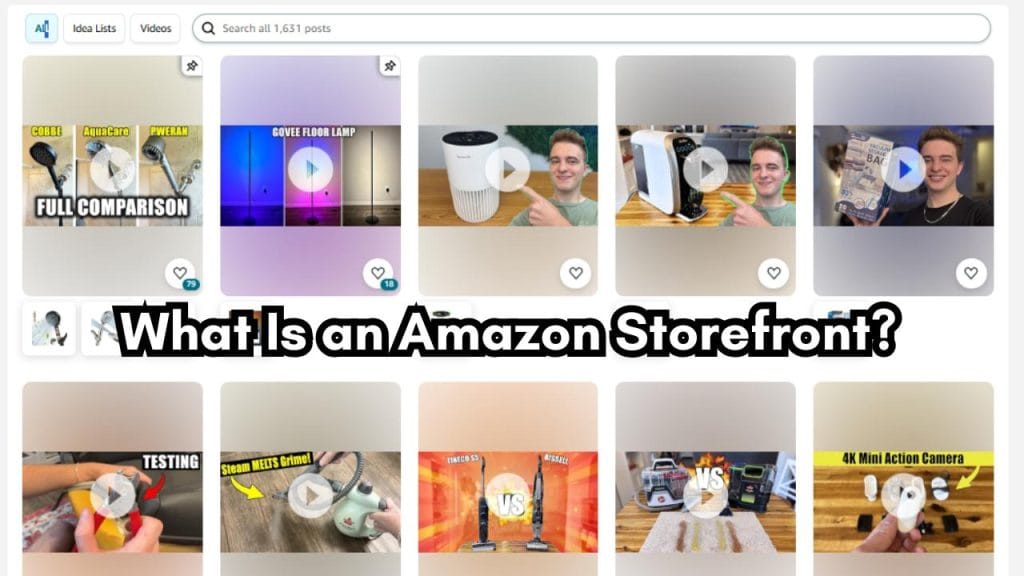
An Amazon Storefront is your personalized page on Amazon. It lets you display all the products you recommend. This is different from a simple product link. Your Storefront acts as a mini-website hosted by Amazon. It shows your style and unique product selection.
Main points about an Amazon Storefront:
- Personalized Page: It is built just for you.
- Curated Selections: You choose the products to feature.
- Trust Building: Your Storefront helps build your online brand.
- Easy to Manage: Amazon hosts and updates your page automatically.
Why Link Your Amazon Storefront to TikTok?

TikTok is one of the fastest-growing social media platforms. It is full of creative and engaging content. Linking your Amazon Storefront to TikTok is a great way to drive traffic to your store.
Benefits of Linking:
- Increased Visibility: TikTok brings millions of users who may become your customers.
- Easy Access: A clickable link in your bio makes it simple for your followers to visit.
- Boosted Sales: More visitors to your Storefront can lead to higher conversions.
- Brand Exposure: Your brand reaches a younger audience that loves video content.
- Cross-Promotion: You can promote products in your videos and let them know where to shop.
When you connect these two platforms, you create an opportunity to earn more. It bridges the gap between entertaining content and real-life shopping. Your TikTok fans can become loyal buyers if they trust your recommendations.
Step-by-Step Guide: Linking Your Amazon Storefront to TikTok
Below is a detailed guide on how to link your Amazon Storefront to your TikTok profile. Follow these simple steps to get your URL in your TikTok bio.

Step 1: Find Your Amazon Storefront URL
- Log in to Your Amazon Seller Central Account:
Open your web browser and go to Amazon Seller Central.
Use your login details to sign in to your account. - Navigate to Your Storefront Section:
Once logged in, look for the section titled “Storefront.”
Click on it to view your Storefront. - Locate the URL:
On your Storefront page, find the URL.
It is usually found under the “Storefront Link” section.
This URL is the web address you will share on TikTok. - Copy Your Storefront URL:
Highlight the URL and copy it.
Make sure you have the entire link so that it works correctly.
Take your time during this step. Confirm that the URL is complete and correct. This is crucial because any error might lead to a broken link.
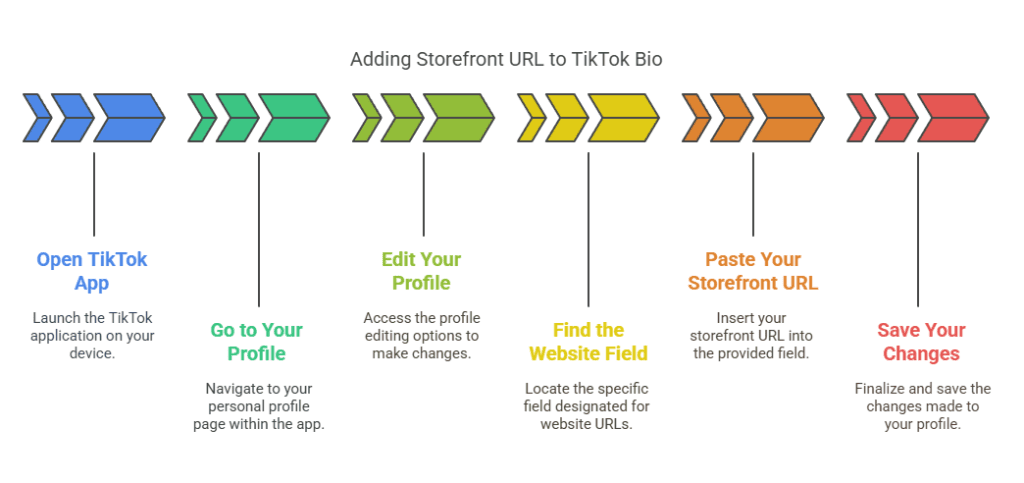
Step 2: Add Your Storefront URL to Your TikTok Bio
- Open the TikTok App:
Launch TikTok on your mobile device.
Log in with your account if you aren’t already logged in. - Go to Your Profile:
Tap on the “Profile” icon at the bottom of the screen.
Your profile page will open showing your videos and bio. - Edit Your Profile:
Look for the “Edit Profile” button.
Tap it to open up the profile settings. - Find the Website Field:
In the edit settings, look for a field labeled “Website.”
This is where you can add your external link. - Paste Your Storefront URL:
Tap on the Website field and paste the URL you copied from Amazon.
Check that the full URL is pasted correctly. - Save Your Changes:
Once you see your Storefront URL in the Website field, tap the “Save” button.
Your TikTok bio now includes your Amazon Storefront link.
By adding your URL, you are guiding your viewers directly to your store. Make sure to test the link by tapping it yourself. This ensures that your audience can reach your Storefront smoothly.
Step 3: Consider Using a Link-Sharing Tool (Optional)
Many TikTok creators have more than one link they want to share. If you have multiple links or wish to organize your links neatly, you can use a link-sharing tool like Linktree.
How a Link-Sharing Tool Works:
- Central Hub: It creates a single URL that houses several links.
- Clean Appearance: Your TikTok bio remains uncluttered.
- Multiple Links: Add links to your Amazon Storefront along with other useful URLs.
Steps to Use a Link-Sharing Tool:
- Sign Up for a Link-Sharing Service:
Visit a website like Linktree.
Create an account with your email and password. - Add Your Links:
Once your account is set up, add your Amazon Storefront URL.
You can also include links to other social media profiles or websites. - Copy Your LinkTree URL:
After adding your links, copy your unique Linktree URL. - Paste in Your TikTok Bio:
Replace your direct Amazon Storefront URL with your Linktree URL in your TikTok bio.
Save your changes.
This method gives you a versatile solution. If you later wish to add more links, you do not need to change your TikTok bio again. Everything stays organized under one link.
Best Practices for a Successful Link Setup

Following best practices helps ensure your links work effectively. Here are some tips:
- Double-Check the URL:
Always test your Storefront link by visiting it.
Make sure there are no typos or missing parts. - Keep It Short and Simple:
Avoid adding extra parameters to your URL unless necessary.
A simple, clean URL works best. - Update Regularly:
If you make changes to your Storefront, update the link in your bio.
Consistency shows professionalism. - Disclose Clearly:
If you are using affiliate marketing strategies, be transparent with your audience.
Let them know you may earn a commission if they shop through your Storefront. - Monitor Performance:
Use tools like Google Analytics if you have a website or TikTok’s analytics.
Track how many visitors click your link and take action.
Implement these tips to build trust with your audience. A clear and well-maintained link shows you value both accuracy and professionalism.
Tips and Tricks for TikTok Success
Linking your Amazon Storefront to TikTok is just one part of a broader strategy. Here are extra tips for making the most of your TikTok presence:

Create Engaging Video Content
- Show Your Products:
Use videos to showcase items from your Storefront.
Explain why you like these products in simple words. - Tell a Story:
Create videos that tell your personal story or why you chose certain products.
Authenticity builds a connection with viewers. - Use Trends Wisely:
Keep an eye on current TikTok trends.
Adapt your content while keeping your brand identity.
Use Clear Calls-to-Action (CTAs)
- Encourage Clicks:
In your videos, remind viewers to visit your profile and click the link in your bio.
Simple CTAs like “Check out my store in my bio” work well. - Engage Your Audience:
Ask questions or suggestions about products in your videos.
Respond to comments to keep the conversation going.
Optimize Your Profile
- Profile Picture and Username:
Use a clear profile picture and a username that reflects your brand.
This builds trust and makes your profile look professional. - Short, Impactful Bio:
Write a concise bio.
Mention that you are an Amazon affiliate or seller if applicable.
Include one clear link (direct or through a link-sharing tool).
Link Effectively Across Platforms
- Cross-Promote:
Share your TikTok videos on other social media channels.
Use your Amazon Storefront link in those profiles as well. - Consistent Branding:
Use the same visual style and messaging across platforms.
This creates a cohesive brand experience for your followers.
Potential Pitfalls and How to Avoid Them
While linking your Amazon Storefront to TikTok is simple, there are some common mistakes you should avoid:
Mistake 1: Using an Incorrect URL
- Check Twice:
Always verify that the Storefront URL you copied is correct. - Test on All Devices:
Make sure the link works on both mobile devices and desktops.
Mistake 2: Neglecting to Update the Link
- Regular Checks:
Review your TikTok bio periodically.
If you update your Storefront, change the URL accordingly. - Set Reminders:
Make it a habit to check your bio every few months.
Mistake 3: Overcomplicating the Link
- Keep It Simple:
Avoid unnecessary add-ons in your URL.
A simple direct link works best. - Use Link-Sharing Tools Sparingly:
While helpful, do not overload your profile with too many additional links.
Mistake 4: Lack of Disclosure
- Be Transparent:
If you earn a commission from the Storefront, mention it.
This builds trust with your audience. - Follow Guidelines:
Stay updated with FTC and Amazon rules on disclosures.
Avoiding these pitfalls keeps your profile professional and trustworthy. Small errors can have a big impact on your credibility.
Frequently Asked Questions (FAQs)
Here are some common questions about linking your Amazon Storefront to TikTok:
Q1: What Is an Amazon Storefront?
A: It is your personal page on Amazon where you curate products for your audience.
Q2: How Do I Find My Storefront URL?
A: Log in to your Amazon Seller Central account, navigate to your Storefront, and copy the URL displayed.
Q3: Can I Link My Storefront to TikTok?
A: Yes. Simply paste your Storefront URL into the Website section of your TikTok bio.
Q4: What If I Want to Share Multiple Links?
A: Use a link-sharing tool like Linktree to organize your links and then add the tool’s URL to your TikTok bio.
Q5: How Often Should I Update My Link?
A: Check your link regularly to ensure it is correct. Update it whenever your Storefront changes.
Q6: Do I Need Special Permissions?
A: No special permissions are needed. Just follow Amazon’s guidelines and TikTok’s profile setup.
These FAQs help clear up any confusion. If you have more questions, many online resources and forums can provide extra help.
My Experience Linking My Storefront
When I first linked my Amazon Storefront to my TikTok profile, I was nervous. I did not know if my viewers would understand the link. I followed these steps one by one, and soon enough, my followers began visiting my Storefront. I started to get more clicks, and over time, I saw an increase in sales.
This simple process made a big difference for my online business. It was a clear lesson in how small changes in your profile can lead to significant results. I learned that clear instructions and a well-maintained profile build trust with your audience.
My advice is to take your time with each step. Check and double-check your URL, update your profile often, and always be honest with your viewers. With dedication and small improvements, you too can see great results.
Additional Strategies to Boost Your Amazon Storefront
Linking your Amazon Storefront to TikTok is just the beginning. Here are additional strategies to maximize your success:
Content Creation on TikTok
- Product Reviews:
Create short videos reviewing products from your Storefront.
Explain why you like them in simple terms. - Behind-the-Scenes:
Show how you choose products for your Storefront.
Let your personality shine through. - Tutorials:
Post how-to videos on using products available on your Storefront.
Practical advice is appreciated by viewers.
Consistency Is Key
- Regular Posting:
Try to post videos on a consistent schedule.
Followers appreciate reliability. - Brand Consistency:
Keep the look and feel of your videos and Storefront similar.
This helps your brand stand out.
Engaging Your Audience
- Ask for Feedback:
Encourage viewers to leave comments about the products.
Ask what items they want to see next. - Reply to Comments:
Engage in conversations with your viewers.
This builds a loyal community. - Host Q&A Sessions:
Answer questions live on TikTok.
Let your followers know more about your Storefront.
Leverage TikTok Features
- Use Hashtags:
Hashtags help your videos reach a wider audience.
Include relevant ones like #AmazonStorefront, #ShopWithMe, or #AmazonFinds. - Collaborate With Others:
Partner with fellow creators.
Cross-promote each other’s links and content. - Track Trends:
Use trending sounds and challenges to get more views.
Adapt these trends to feature products from your Storefront.
How to Monitor Your Success
Once you have linked your Storefront and started posting on TikTok, it is important to check your performance. Here are a few ways to monitor your success:
Use Analytics Tools
- TikTok Analytics:
TikTok offers built-in analytics that show your video views, profile visits, and link clicks. - Amazon Seller Metrics:
Check your Amazon reports to see how many visitors come to your Storefront from external sources. - Google Analytics:
If you have a website linked with your Storefront, Google Analytics can help you monitor traffic and behavior.
Set Goals
- Track Conversions:
Set specific goals for how many clicks you want from TikTok to your Storefront. - Review Regularly:
Check your analytics weekly or monthly.
Adjust your strategy based on the numbers.
Learn From Your Data
- Experiment:
Try different video formats and posting times.
See which methods bring more visitors. - Refine Your Content:
If one type of video works better, produce more of that style. - Stay Flexible:
Trends can change fast on social media.
Be ready to update your tactics as needed.
Final Thoughts
Linking your Amazon Storefront to TikTok is a simple process that can have a big impact. In plain language, the steps are straightforward:
- Find your Amazon Storefront URL in your Seller Central account.
- Copy the URL.
- Open your TikTok profile and tap “Edit Profile.”
- Paste the URL in the Website field.
- Save your changes.
You also have the option to use a link-sharing tool like Linktree if you need to share more links. This extra step can help if you have multiple pages or social profiles you want to drive traffic to.
Every small detail matters. With a clear and well-managed profile, you build trust with your audience. Simple adjustments like linking your Storefront can lead to more visitors and possibly higher sales.
Your Journey to Digital Success
When you take the time to connect your Amazon Storefront with TikTok, you open a new channel for growth. It may seem small, but each click from TikTok can lead to a sale on Amazon. This adds up quickly over time.
Here is a quick checklist to remember:
- Confirm your Storefront URL is correct.
- Copy it accurately from Seller Central.
- Paste the URL into your TikTok bio.
- Consider using a tool like Linktree for multiple links.
- Test your link on different devices.
- Monitor your performance with analytics.
Take these steps one at a time and check your work. Consistency is key in digital marketing. With patience, you will see a return on your efforts.
How Technology Makes It Easier
Many successful online marketers use digital tools to streamline amazon affiliate marketing. One such tool is Affpilot AI. Although our main focus here is on linking your storefront, consider these benefits:
- Automation:
Tools like Affpilot ai can help create posts that include your Amazon links automatically. - Time Savings:
Automation frees up your time to focus on making engaging videos and interacting with your followers. - Accuracy:
When every link is checked and generated by smart tools, your chances of having broken or incorrect links are reduced. - Compliance:
Automated tools follow the official guidelines, keeping your store and links safe from any errors.
In Summary
Linking your Amazon Storefront to TikTok is a powerful way to connect with an audience. The process is simple and effective. Here are the key takeaways:
- Find Your URL:
Log in to Amazon Seller Central, navigate to your Storefront, and copy the link. - Add to TikTok:
Open TikTok, edit your profile, and paste the URL in the Website field. - Optional Use of Linktree:
If you want to share multiple links, use a link-sharing tool like Linktree. - Test and Monitor:
Always test your link and check its performance using analytics. - Stay Consistent:
Regularly update your information and keep your profile engaging.
By following these simple steps, you build a bridge between entertaining content and your curated Amazon products. It is a small change with the potential for big rewards.
Our Sample Article

Benefits of Meditation: Unlocking Peace and Productivity
Shahidujzaman Shahid · May 29, 2024
How to Choose a Probiotic: Your Essential Guide
Shahidujzaman Shahid · May 29, 2024
Why Does My Cat Keep Throwing Up? Uncover the Causes!
Shahidujzaman Shahid · May 29, 2024